The missing offline mode for Protect & Trace Wi-Fi.
HP's Wi-Fi tier can't reach a PC that's offline. Troverlo can — on the same Wi-Fi radio HP already ships, with zero new BOM, zero carrier dependency, zero network connectivity, and zero upgrade wall. An offline connectivity upgrade to the tier you already sell.
HP already runs the right two-tier structure. Troverlo extends the lower tier — without touching the upper one.
HP sells two distinct Protect & Trace tiers today. Protect & Trace with Wolf Connect — the premium, cellular-backed tier — is HP's exclusive offline/powered-down capability, and per HP's own datasheet delivers "the highest level of assurance… even if the target PC is off". It ships on select G10-and-later EliteBook, ProBook 400+ and mobile workstation SKUs, ordered at time-of-PC-purchase only.
The other tier — Protect & Trace, Wi-Fi/Internet only — is HP's mainstream, low-cost answer. It runs on the same WXP backend as Wolf Connect and shares an identical operational model. But per HP's own datasheet, it requires the PC to be powered on and connected to the internet to work. That's where Troverlo comes in.
HP's own datasheet is explicit about what the Wi-Fi tier can't do.
From HP Wolf Protect and Trace Datasheet (Wi-Fi / Internet): "HP Protect and Trace works over any Wi-Fi / Internet connection… For the highest level of assurance, consider Protect and Trace with Wolf Connect, which works over cellular communications, even if the target PC is off."
Troverlo's connectionless Wi-Fi observation runs on the radio the PC already carries — no cellular module, no active internet session, no association, no handshake. Same category of outcome as the Wolf Connect cellular tier's find-lock-erase promise, but delivered from the Wi-Fi radio a PC keeps in a low-power beacon state even when the user thinks it's "off the network."
HP has told these customers there's no path forward. That's the population Troverlo serves.
From HP's own Wolf Connect FAQ: "Customers who purchase HP Wolf Protect and Trace (which only supports Wi-Fi connectivity) cannot upgrade to HP Protect and Trace with Wolf Connect."
It's a hard SKU wall — once a PC ships Wi-Fi-only, the cellular door is permanently closed. That's the fleet Troverlo unlocks. Not by challenging the Wolf Connect SKU, and not by asking HP to redesign a motherboard. By running a firmware-only connectionless payload on the Wi-Fi radio that's already in the box.
Jonathan Gohstand told Spiceworks at the 2023 launch: "most people don't put [broadband cards] in their PCs." That's HP's own on-record acknowledgment of where the fleet actually sits. The overwhelming majority of the ~53-57M PCs HP ships every year are Wi-Fi-only — including nearly the entire desktop line, most ProBook / entry commercial configurations, and every consumer machine. Troverlo's TAM inside HP is that population.
Select G10+ EliteBook, ProBook 400+, mobile workstation SKUs. At time-of-purchase only.
Consumer, most commercial, desktop, workstation. Every PC HP has already sold Wi-Fi-only.
An ingredient inside HP's existing operational model, not a rip-and-replace.
HP's own Wolf Connect solution brief already confirms the integration pattern: "A PC fleet with a mix of Protect and Trace and Protect and Trace with Wolf Connect PCs is supported in the same WXP instance, with the common operational model."
Troverlo slots into that identical mixed-fleet model as a third source of transport — Wolf Connect (cellular) for the assurance tier, Protect & Trace (Wi-Fi/Internet) for the online mainstream tier, and Troverlo (connectionless Wi-Fi observation) for the offline mainstream fleet HP has no answer for today. Same WXP tenant. Same operational language. Same fleet visibility surface. HP's IT customers manage a single fleet, HP's product team gets to sell a genuinely offline-capable Wi-Fi tier for the first time.
HP's own product organization is already moving in this direction.
In May 2025, HP Wolf Security publicly launched a new low-cost Wi-Fi version of Protect & Trace, narrated on video by Jonathan Gohstand himself. In April 2026, HP messaged full WXP integration of both variants as a unified, mixable fleet model — "Protect & Trace Wi-Fi and Wolf Connect" in the same breath.
HP's multi-year trajectory is broadening the reach of the Wolf Connect brand promise via Wi-Fi economics. Troverlo isn't asking HP to change direction — Troverlo is the technology that lets HP finish the direction it's already publicly moving in. The offline capability the Wi-Fi tier is missing today. Ready now. Runs on the Wi-Fi radio HP already ships.
30 minutes.
A walk-through of the two-tier fit, the connectionless Wi-Fi mechanism, and a reference architecture that plugs into WXP alongside Protect & Trace and Wolf Connect. Happy to start with the no-upgrade-path population — customers HP itself says can never receive cellular, but where a firmware payload can extend Wolf-Connect-grade offline reliability to the PCs they already own.
Walk, then run. A Windows service today — OEM-integrated on the Wi-Fi radio tomorrow.
Troverlo is a two-phase capability. Phase 1 runs as a Windows service inside HP's existing distribution rail — no hardware change, no new BOM, deployable to the shipped Wi-Fi HP fleet through the update channel HP already uses. Phase 2 moves that same mechanism into the Wi-Fi radio itself, OEM-integrated on new HP platforms. Same connectionless observation. Same WXP integration. Different depth in the stack.
Two modes, one radio. Scan when online. Beacon when offline. No association, no handshake.
The Wi-Fi radio behaves the way it already does when the OS looks for available networks. It records the surrounding APs it hears — BSSID, SSID, frequency, RSSI, timestamp — and forwards that snapshot to the Troverlo cloud over standard HTTPS. Every online HP PC becomes an observer for every offline PC in its vicinity.
The Wi-Fi radio emits a Troverlo-formatted identifier as a standard Wi-Fi beacon. Any nearby scanning device — an online HP PC, a phone, a partner observation node — records the beacon and reports it to Troverlo. The offline PC is seen even though it has no network session.
Both modes ride Wi-Fi management frames — the same category of frame every Wi-Fi device transmits before it associates with a network. No user credential. No captive portal. No IP stack required in beacon mode. No association. No handshake. The Troverlo payload just adds structured meaning to what the radio is already doing at Layer 2.
Two deployment phases. Same mechanism, deeper in the stack over time.
HP does not have to pick between an OS-level product now and a hardware-integrated product later. The mechanism is the same in both phases. Phase 1 gets HP an offline Wi-Fi capability quickly — on the fleet HP has already shipped. Phase 2 hardens it into the platform on new HP PCs, at HP's own cadence.
Works on the Wi-Fi HP PCs already in customers' hands. No new SKU, no refresh cycle, no waiting on next-gen platforms. HP gets to stand up and say “the entire Wi-Fi HP fleet now has offline find, lock, and wipe.” Covers the powered-on / offline-network case; the powered-off case is what Phase 2 delivers.
- LayerWindows service, runs in the background whenever the OS is up. Uses the standard Wi-Fi adapter for scan mode and the Wi-Fi Direct adapter for beacon mode.
- DistributionHP's existing update rail — HP Support Assistant, HP Image Assistant, or the same TechPulse / WXP channel HP already uses to reach the fleet.
- HP hardware changeNone. No new BOM. No motherboard rework. No Endpoint Security Controller changes. No cellular contract.
- Fleet reachFull legacy compatibility — every Wi-Fi HP PC already in the field on a supported Windows version. macOS, ChromeOS, Linux on the roadmap.
- Marketable asA Wolf Security feature roll-out to the entire installed base. Not a next-gen SKU exclusive — an announcement HP can make against PCs already sold.
- Power-state coveragePC on, Windows running, offline from the network: yes. PC off / no OS loaded: no (Phase 2 delivers that).
- Time to valueWeeks, not quarters. Software product HP could ship next update cycle.
Location, telemetry, and commands all reach the PC on the Wi-Fi radio — whether it's on and connected, on and offline, or fully powered off with no OS loaded and the disk encrypted at rest. Same class of assurance HP delivers today via Wolf Connect cellular, delivered on the Wi-Fi radio the mainstream fleet already has.
- LayerOEM-integrated on the Wi-Fi radio HP already ships. Runs below the OS — independent of Windows uptime, boot state, or disk state.
- DistributionShips on new HP PCs as part of the platform. Same PC-purchase motion HP uses for Wolf Connect eligibility today.
- HP hardware changeNo new BOM. No cellular modem, no SIM, no new antenna. A capability inside the Wi-Fi silicon HP is already selecting cycle over cycle.
- What HP can doLocate a powered-off PC on the Wi-Fi observation network. Pull telemetry back from a device with no OS loaded. Execute commands — lock, wipe, quarantine — that reach the machine on the radio, regardless of Windows state.
- Power-state coveragePC on and connected: yes. PC on and offline: yes. PC off / no OS loaded / disk encrypted at rest: yes.
- Time to valueAligned to HP's next PC platform cycle. Not a blocker for Phase 1.
The PC is seen even when it isn't on the network.
Same flow in both phases. The only difference is where the beacon comes from: the Windows service in Phase 1, or the Wi-Fi radio itself in Phase 2. Everything downstream is identical.
The PC beacons.
The HP PC transmits a Troverlo-formatted identifier on its Wi-Fi radio at a configured interval. In Phase 1 the Windows service drives the transmission while the OS is running; in Phase 2 the Wi-Fi radio itself beacons even when the PC is powered off.
Observers hear it.
Any Troverlo-enabled node in range — peer HP PCs, HERE partner infrastructure, other partner observation points — records the identifier plus a timestamp and its own known position.
Observations reach the cloud.
Observer nodes forward what they heard to the Troverlo cloud whenever they next have connectivity. The observed PC itself doesn't need to be online — its neighbors are.
Troverlo correlates.
Multiple independent observations trilaterate the PC's location and confirm its state (present, seen recently, dark for > N hours). Position confidence rises with observer density.
WXP surfaces it.
HP's WXP tenant pulls the PC's state via the Troverlo integration API and renders it alongside the online Protect & Trace and Wolf Connect fleet data. IT sees a single fleet, one console, one operational language.
Same rail, reversed. Lock, erase, and locate directives reach the PC through its neighbors.
Observation gets Troverlo from the PC. Command and control goes the other way — a signed directive routed from WXP through the observation network back to the target PC. The PC executes it connectionlessly. No cellular. No incoming network session required. What the PC will execute depends on the phase: an OS-level action in Phase 1, a below-OS action independent of Windows state in Phase 2.
IT issues a directive in WXP.
Lock this laptop. Erase it. Ping for location. Same operational language the WXP console already uses for Wolf Connect and Wi-Fi tier machines.
Troverlo signs and stages.
The directive is cryptographically bound to the target PC's identifier. It cannot be replayed against a different machine. It cannot be forged by an observer node.
Observers relay it into RF range.
Whichever observer nodes are within radio range of the target PC will attempt to deliver the signed directive on the connectionless rail. The PC does not need to associate, authenticate, or accept a data session to receive it.
The PC validates and executes.
Phase 1: the Windows service verifies the signature and executes at the OS level while Windows is running. Phase 2: the Wi-Fi radio itself verifies and executes below the OS — lock, wipe, and locate reach the PC whether Windows is up, down, or the disk is encrypted at rest.
Acknowledgment rides observation back to WXP.
The PC beacons an ack. Observers hear it. WXP shows the state change — locked, erased, located — the same way it shows a Wolf Connect response today.
The stack, top to bottom.
Phase 2 (run): OEM-integrated on the Wi-Fi radio, independent of OS state.
Asset data, not user data. Outbound-only. No PII. Same posture in both phases.
The Wolf Security audience will want to know exactly what Troverlo touches and what it doesn't. Short version: Troverlo observes device identifiers and publicly-broadcast Wi-Fi management frames — the same class of data every Wi-Fi device in the world already emits. It never sees user content, credentials, or application data. Every network path is outbound-only from the PC. No inbound connections. No open ports.
api.find.troverlo.com:443. No inbound connections to the PC. No open ports. No listening service exposed to the network.Wolf Connect stays the premium tier. Troverlo extends the Wi-Fi tier.
Wolf Connect remains the assurance tier.
Cellular delivery, ESC-anchored, powered-off capable, hardware root-of-trust. Sold on the SKUs it's already sold on today. Troverlo does not replace or de-differentiate that promise.
Phase 1 is additive to the shipped Wi-Fi fleet.
A Windows service that ships through HP's existing update rail. No new SKU. No forked driver. HP can announce it as a Wolf Security feature roll-out against every Wi-Fi HP PC already in the field.
Phase 2 lifts the Wi-Fi tier over time.
On next-generation platforms, the same capability moves into the Wi-Fi radio itself — giving the mainstream tier powered-off reach at HP's own cadence, without touching Wolf Connect's hardware-anchored premium.
Same WXP. Same operational language.
IT customers don't learn a new console. Existing Protect & Trace and Wolf Connect workflows continue unchanged. Troverlo state renders in the same view.
Two devices. One moment.
Microsoft's Find my device and Troverlo, captured 60 seconds apart.
A first-party comparison. Two devices signed into the same Microsoft account and instrumented with Troverlo. Both actually sitting at Lucky Goat Coffee, 3345 University Dr E, Bryan, TX. Screenshots captured on August 19, 2026 between 9:37 and 9:44 AM CDT. Nothing staged, nothing recreated.
Same two devices. Same account. Same moment.
What Microsoft's Find my device returns.
From account.microsoft.com/devices, signed into the same account that owns both devices, captured between 9:41 and 9:43 AM CDT on August 19, 2026.
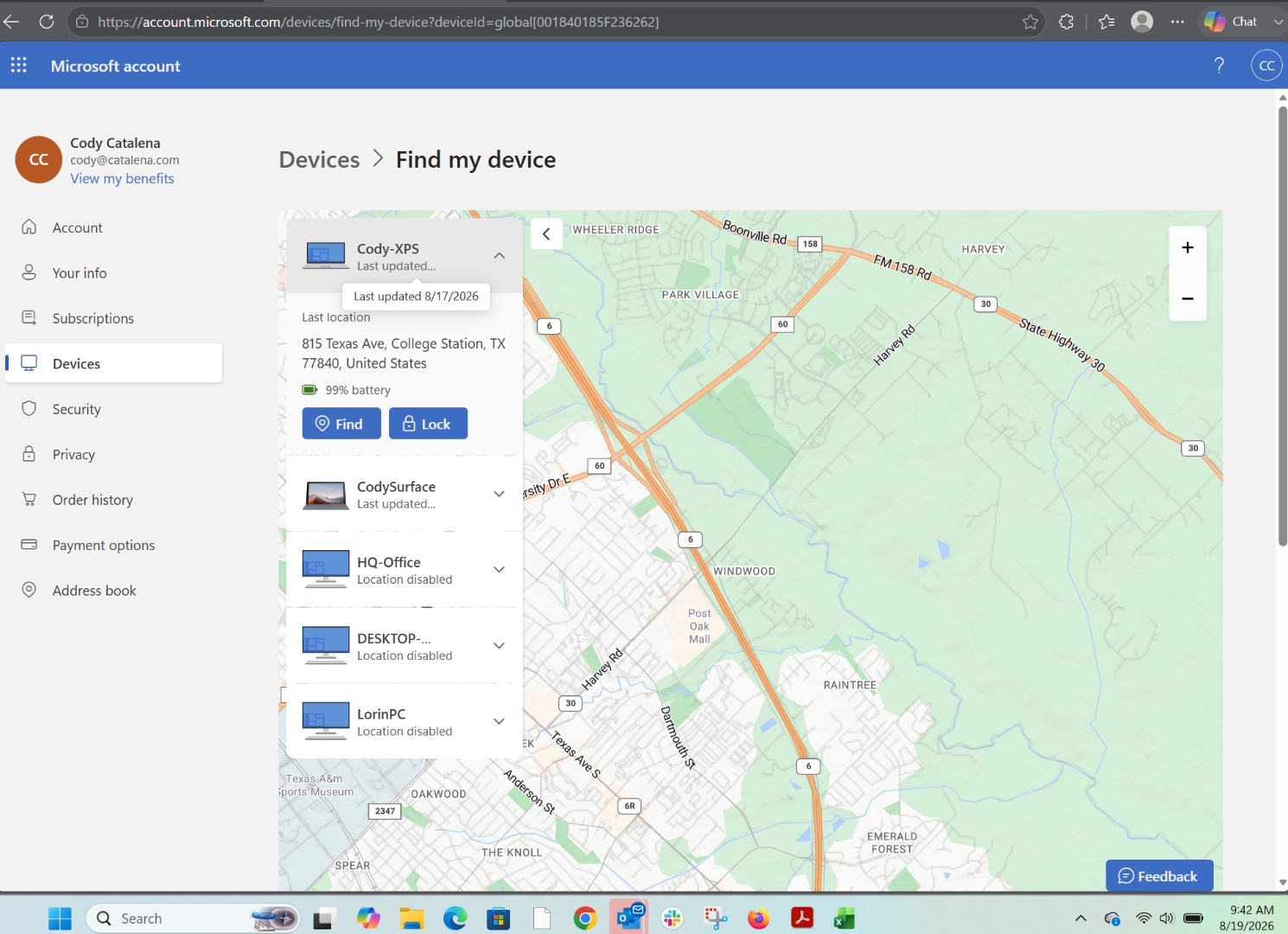
- Last updated8/17/2026 · 48 hours ago
- Address shown815 Texas Ave, College Station, TX 77840
- Map pinDoes not correspond to the address shown — appears dropped roughly in central College Station
- Actual location3345 University Dr E, Bryan, TX
- Distance from actual~5.5 miles
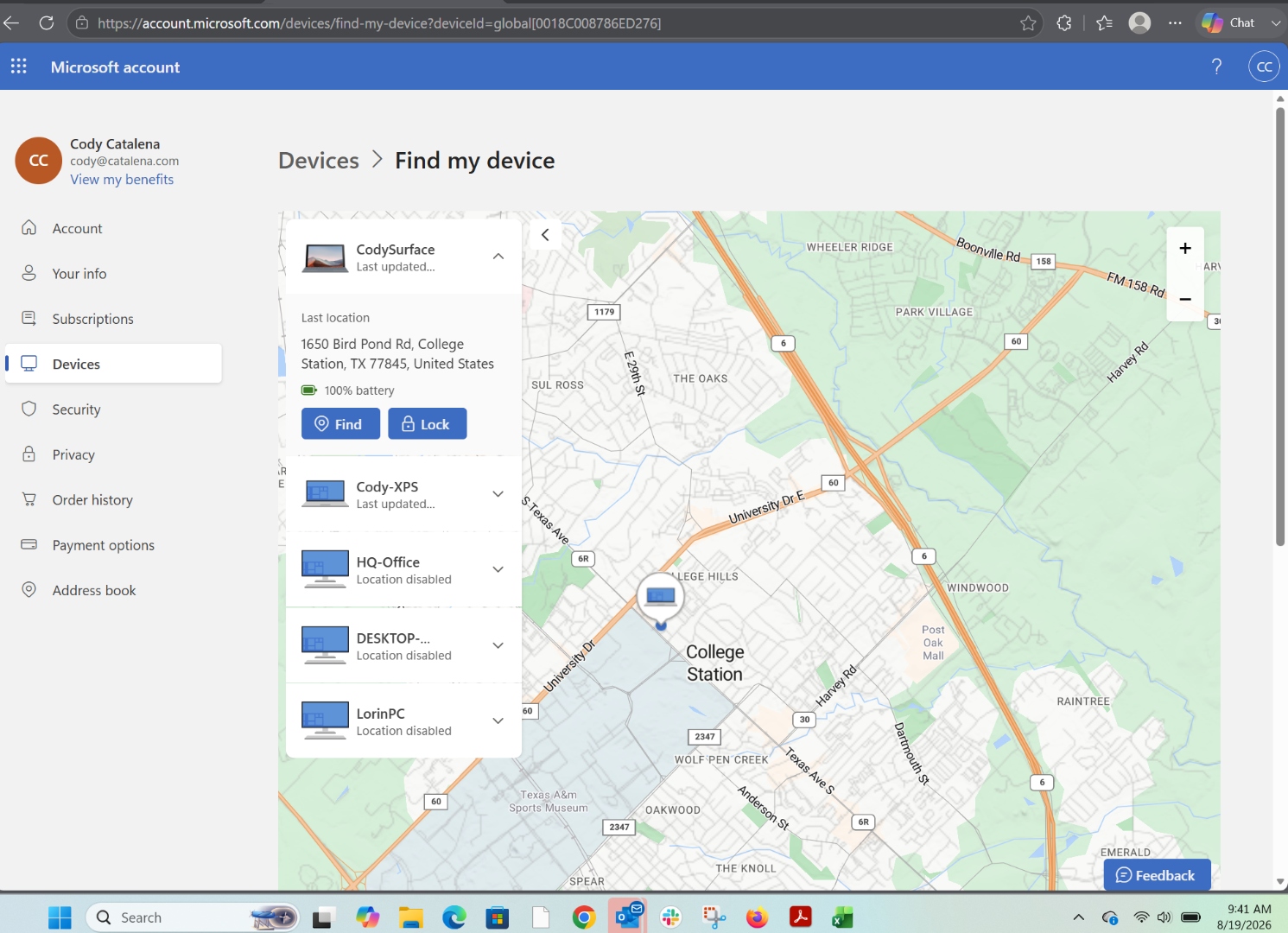
- Address shown1650 Bird Pond Rd, College Station, TX 77845
- Reality of that addressDevice has not been at this address in over a year
- Map pinDoes not correspond to the address shown — appears dropped roughly in central College Station
- Battery shown100% · stale telemetry, not a current reading
- Actual location3345 University Dr E, Bryan, TX
- Distance from actual~10 miles
- Update location (offline)Cannot fetch a fix — device is off-network
Refreshing the panel and selecting Microsoft's "Update location" control did not correct either address or either map pin during the capture window. Both devices are shown with addresses and pins that do not match each other and do not match the devices' actual location.
What Troverlo returns for the same two devices.
From portal.find.troverlo.com, the same Microsoft account owner, captured at 9:37–9:38 AM CDT on August 19, 2026 — inside the same two-minute window as the Microsoft screenshots.
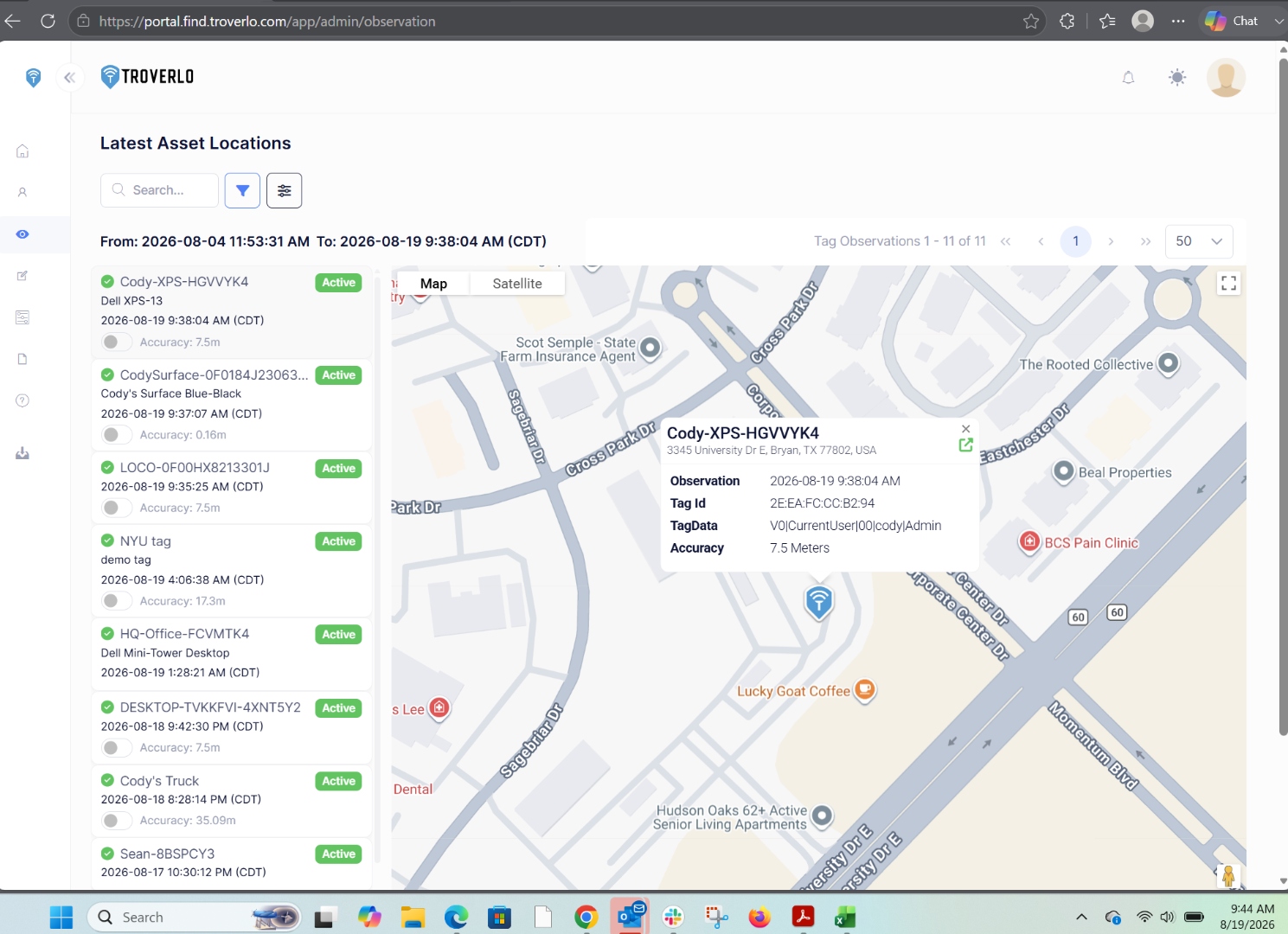
- Observation timestamp2026-08-19 9:38:04 AM CDT · < 6 min old
- Address3345 University Dr E, Bryan, TX 77802
- Map pinMatches the address
- Accuracy7.5 meters
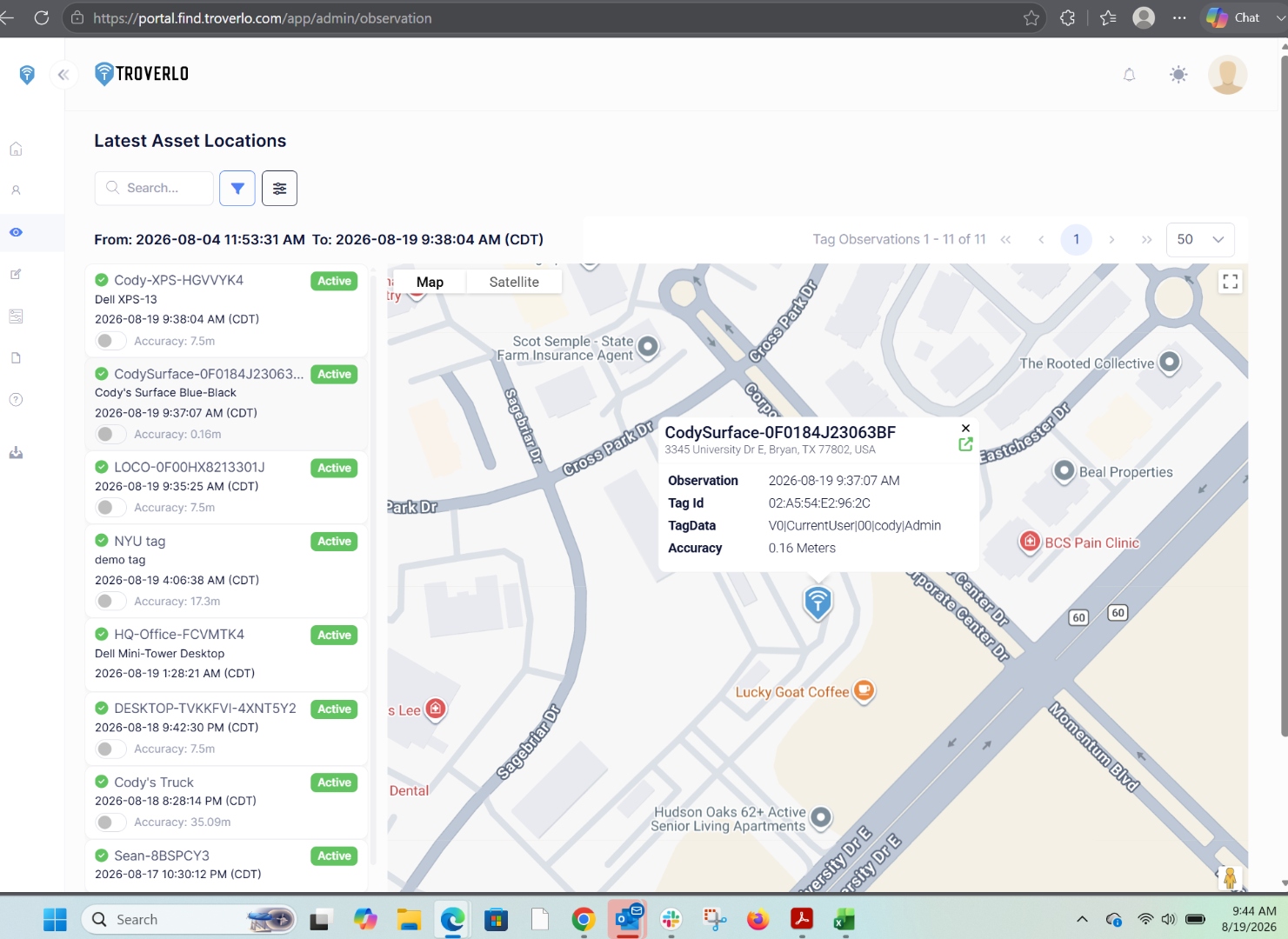
- Observation timestamp2026-08-19 9:37:07 AM CDT · < 7 min old
- Address3345 University Dr E, Bryan, TX 77802
- Map pinMatches the address
- Accuracy0.16 meters · sub-meter
- Located while offlineYes — off-network, mobile for days prior
Side by side, one row per fact.
| Microsoft Find my device | Troverlo | |
|---|---|---|
| Freshness — online device (XPS) | 48 hours | Less than 6 minutes |
| Freshness — offline device (Surface) | Stale — device has not been at the address shown in over a year | Less than 7 minutes |
| Locates a device that is off-network | No — shows a stale last-known location instead | Yes — observed within the last 7 minutes |
| Address ↔ map pin alignment | Mismatch | Consistent |
| XPS location error vs. actual | ~5.5 miles | 7.5 meters |
| Surface location error vs. actual | ~10 miles | 0.16 meters |
| Requires the device to be online | Yes | No |
| Requires a cellular modem | No | No |
| Requires new hardware on the PC | No | No — uses the Wi-Fi radio already in the device |
| Location source | IP address and cached Wi-Fi / cell fingerprints | Direct observation of the device by a third-party Wi-Fi radio |
| Can be fooled by VPN or corporate egress rewrites | Yes | No — observation happens in the physical environment |
Location error compares Microsoft's returned address (Cody-XPS card) and displayed map pin to the actual physical location of the device (3345 University Dr E, Bryan TX). Troverlo's accuracy figure is the value reported on the observation record.
Two different mechanisms produce two different results.
The PC reports its own location to Microsoft over the PC's own network connection. When the PC last checked in, Microsoft resolved that check-in against IP-geolocation databases and cached Wi-Fi and cell-tower fingerprints. The result is a location the PC says it is at, not a location a third party observed it at. When the device is off-network the last-known value stays put; when it is online the value can still be wrong by miles because the underlying IP or fingerprint lookup was imprecise or stale.
- Location is derived from IP address and cached Wi-Fi / cell fingerprints, not a scan of what is physically nearby
- Can be fooled by a VPN, a corporate egress node, or a stale fingerprint database
- Device must be powered on and have a working network path to Microsoft for any refresh
- Feature must be enabled before the device is lost
- Not available on all Windows devices — several devices on this account show "Location disabled"
The device beacons a small identifier over standard Wi-Fi frames without associating to any network. Any Wi-Fi radio nearby — an access point, a vehicle, a partner device, another PC — observes the beacon and reports it back through the Troverlo Observation Network with the observer's own GPS-grade position. The location is where a third party actually saw the device, in the physical Wi-Fi environment around it. There is no IP address to look up and no fingerprint to guess. That is why CodySurface was located at sub-meter accuracy while it was offline and moving.
- Location is an observation of the device's real physical environment, not an inference from network metadata
- Cannot be fooled by VPNs, egress rewrites, or outdated fingerprint databases
- Device does not need a network connection or to be booted into the operating system
- Any nearby Wi-Fi radio can be the observer — infrastructure or peer
- Works on the Wi-Fi radio already in every commercial PC